How kanban-md changed the way I plan and ship software
A working note on file-based project management, and why a flat tree of markdown files outperforms every kanban board tool I've used.
Project management tools often add more friction than they remove. Every kanban tool I'd tried before ended the same way. Initial enthusiasm. Three months of dutiful card creation and maintenance. Then a slow drift into staleness as the work outran my willingness to context-switch into a separate app and click around. The board became an outdated reality that contradicts the codebase.
Why kanban-md stands out
kanban-md, by antopolskiy on GitHub, fixes that by removing the context switching. The board IS a local directory on my computer. Each task is a markdown file in `kanban/tasks/` with YAML frontmatter for the structured fields (id, status, priority, tags) and free-form text to document every task and rationale. Default columns are the predictable five: backlog, todo, in-progress, review, done. Since the release of Claude Code, I've been developing using the command line interface (CLI). Claude Code allows the LLM to work on my local file system using a variety of tools provide by the harness.
Kanban-md also ships with skills that Claude Code can use, so the LLM handles the kanban card moves and edits; the cards are just text files. They live in the Github/Gitlab repository (repo), version with every commit, and read perfectly well in a plain editor when the CLI isn't around.
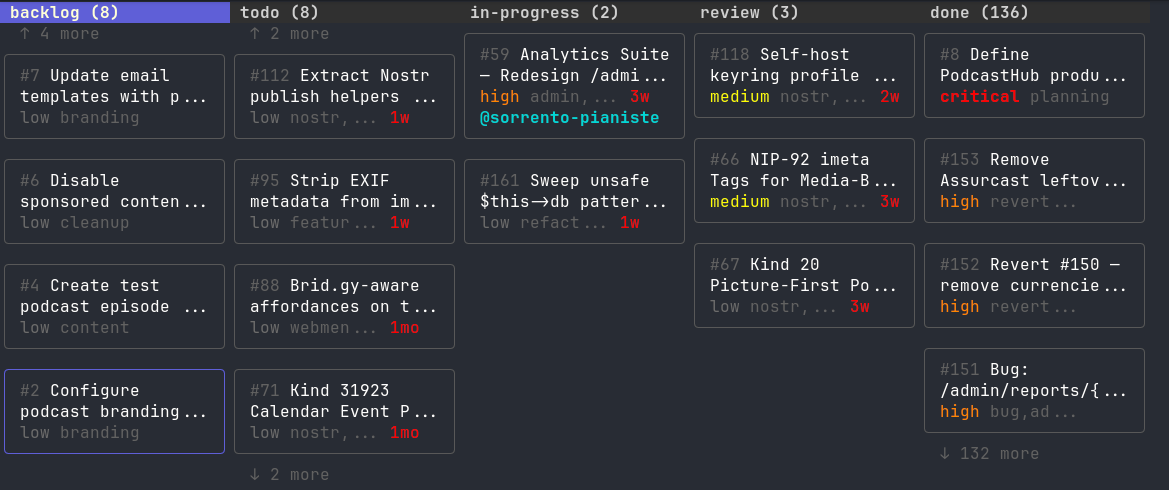
That sounds modest until you actually use it. On Signalkit my board has 157 cards now: backlog (8), todo (8), in-progress (2), review (3), and done (136). A handful are the work of the moment or future work; the rest are a layered record of decisions, trade-offs, and phased development.
Built for agent workflows
A major part of kanban-md’s appeal is how well it supports AI agent workflows. It includes commands such as create, list, show, edit, move, delete, archive, pick, metrics, and context, which let agents interact with tasks directly from the terminal.
The project also emphasizes token efficiency. Its compact output mode is designed for agent loops, which matters when many tasks need to be polled or processed repeatedly. In practical terms, that makes kanban-md less like a generic task app and more like infrastructure for automated collaboration.
Human-friendly too
kanban-md is not only for machines. It includes an interactive TUI, `kanban-md-tui`, so people can browse and edit boards visually inside the terminal. That gives teams a familiar Kanban experience without leaving their development environment.
If you ship software with an AI agent in the loop, give your board a filesystem root. The friction of context-switching to a SaaS tool melts away. The decisions accumulate where the code lives. Both audiences, you and the model, read from the same source. kanban-md is the cleanest expression of this idea I've found. Try it on a side project and see how quickly you stop missing your existing project management application.
AI + Human collaboration
The deeper thing, and the reason I'm writing this post, is that kanban-md happens to be the perfect foundational layer for human-and-AI collaboration. Claude reads the board the same way I do (these are markdown files; nothing to integrate). When we agree on a direction, the agent files the card. When we disagree, the rationale lives in the card body. When a future session restarts with no memory, the cards ARE the memory. I rejected a P1 design finding two days ago and the agent filed a "rejection memo" card explaining why. The card lives in my repo, with the trade-off table documented.
Who it is for
kanban-md is a strong fit for:
- Developers who want tasks stored in Git next to the code.
- Small teams that prefer local-first, transparent workflows.
- AI-assisted projects that need safe task claiming and compact context output
- People who like terminal tools but still want a visual Kanban experience.
It is less ideal for teams that depend on deep enterprise integrations, advanced reporting dashboards, or a highly managed SaaS environment. kanban-md’s strength is its simplicity and file-native design, not heavyweight process tooling.
Final take
kanban-md is a thoughtful take on Kanban for modern development teams. By making tasks plain Markdown files, it delivers portability, version control, offline use, and strong support for AI-assisted work. If you want project tracking that feels native to Git rather than bolted on top of it, kanban-md is worth a look.
#howiai